

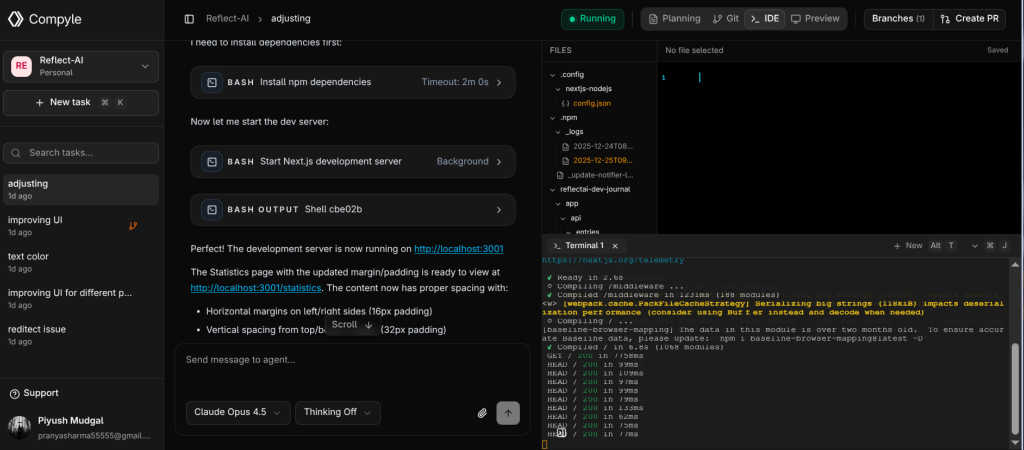
Terminal Overview
Collaborative Workspace
Compyle isn’t just an editor—it’s an intelligent workspace. The terminal works alongside the agent to give you full visibility into what’s happening.
Compyle isn’t just an editor—it’s an intelligent workspace. The terminal works alongside the agent to give you full visibility into what’s happening.
Key features
- Live Logs: Watch your server output and build processes in real-time.
- Interactive Shell: Run manual tests, git commands, or scripts whenever you need to take control.
- Port Forwarding: Access your running application locally for testing.
Start scripts
- You can set up start scripts in the Start Scripts tab in Projects, and those commands will run every time a new task is created.
Start Scripts
Tip
If the agent is running a task, you can open the terminal to see exactly what commands it’s executing and their output.
If the agent is running a task, you can open the terminal to see exactly what commands it’s executing and their output.
Troubleshooting
- Server crashed? Check the terminal logs for error messages to share with the agent.
- Dependency issues? You can run
npm installmanually in the terminal if needed.
Editor
Check out Editor features
Changelog
Check out Changelogs