

How GitHub Works in This Environment
A repository represents your project, and each task is expressed as a dedicated pull request (PR).This structure maintains clarity, separates workstreams, and keeps version control organized.
Working with GitHub
You can manually commit and push changes, manage branches, and create PRs directly through the Git interface.
You can manually commit and push changes, manage branches, and create PRs directly through the Git interface.
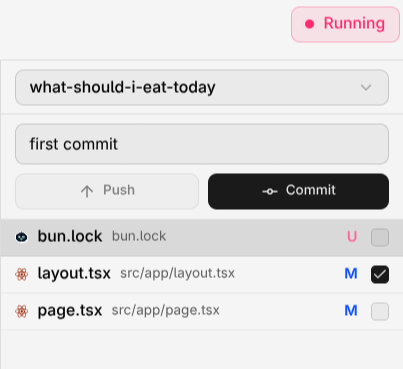
Committing Changes
You can commit files at any time:- Open the Git tab.
- Select the files you want to include in the commit.
- Enter a commit message.
- Commit and push whenever ready.
Creating Pull Requests
You can create and manage pull requests directly from Compyle:- Sync your files with the remote repository.
- Push your changes to your branch.
- Open a PR for review or integration.
Github
Checkout Github 101