> ## Documentation Index
> Fetch the complete documentation index at: https://docs.compyle.ai/llms.txt
> Use this file to discover all available pages before exploring further.
# Terminal
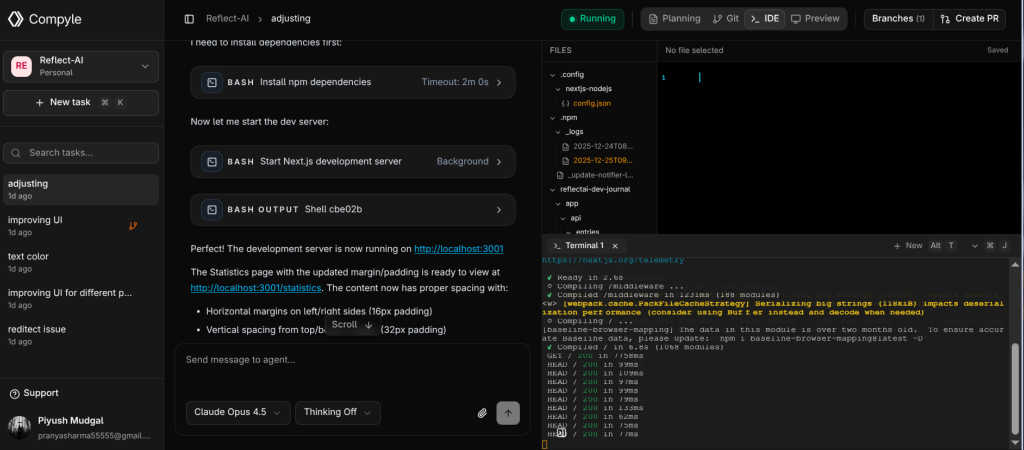
The Terminal provides direct access to the environment where your project runs. It allows you to monitor build logs, run commands, and verify your application's status in real-time.
Collaborative Workspace
Compyle isn't just an editor—it's an intelligent workspace. The terminal works alongside the agent to give you full visibility into what's happening.
***
## Key features
* **Live Logs:** Watch your server output and build processes in real-time.
* **Interactive Shell:** Run manual tests, git commands, or scripts whenever you need to take control.
* **Port Forwarding:** Access your running application locally for testing.
***
## Start scripts
* You can set up start scripts in the Start Scripts tab in Projects, and those commands will run every time a new task is created.
```bash theme={null}
# Install dependencies
bun install
# Mount Folder
cd
# View logs
bun run dev
```
Tip
If the agent is running a task, you can open the terminal to see exactly what commands it's executing and their output.
***
## Troubleshooting
* **Server crashed?** Check the terminal logs for error messages to share with the agent.
* **Dependency issues?** You can run `npm install` manually in the terminal if needed.
***
Check out Editor features
Check out Changelogs